Lakebase branching: a database per pull request
Import your real database into Lakebase once, then branch it per pull request: production-fidelity preview environments that build and destroy themselves.
The demo passed. It always passes. Synthetic data is generated by the same people who wrote the code, so it has exactly the shape the code expects: clean foreign keys, sensible dates, no surprises. Then the feature meets production, and it breaks on the one row nobody thought to generate. The customer with a null in a column your migration assumed was populated. The tenant with two million records where your test fixtures had fifty. The address from 2014 with an encoding your parser never saw.
For complex data products, synthetic data does not test the thing that actually fails. The bug lives in the data you did not have. And the reason teams tolerate that gap is not ignorance, it is cost: standing up a real, isolated copy of production for every branch used to be slow and expensive enough that nobody did it. Lakebase branching removes that excuse. You can give every pull request its own production-fidelity database, in seconds, and destroy it on merge. This is the how-to.
If Lakebase itself is new to you, start with what it is and how to prepare. This post assumes you know it is serverless Postgres inside Databricks and picks up at the part that changes your SDLC.
The database is the part that never went ephemeral
Everything else in your stack got disposable years ago. Containers spin up and die. Vercel and Netlify hand every PR its own preview deploy. Your frontend, your API, your workers: all cattle, no pets.
The database stayed a pet. It is stateful, and state is stubborn, so teams landed on one of two compromises and lived with the tax:
- A shared staging database. One environment, many branches, serialized. A destructive migration on one PR blocks everyone else. The data drifts from production the moment someone runs a manual fix, and by month three nobody trusts it.
- Synthetic seed data per environment. Isolated, but fictional. It reproduces the schema and none of the reality: not the skew, not the null rates, not the referential edge cases, not the one enormous account that makes your query plan fall over.
Both fail the same test. Neither one lets a reviewer see the change running against data that behaves like the real thing. That is the whole point of a preview environment, and the database is exactly where the illusion breaks.
Step 1: get the real database in, once
Branching is only useful if the trunk it branches from is real. So the first move is a one-time import of production into a Lakebase project, and there are two paths depending on where your data lives.
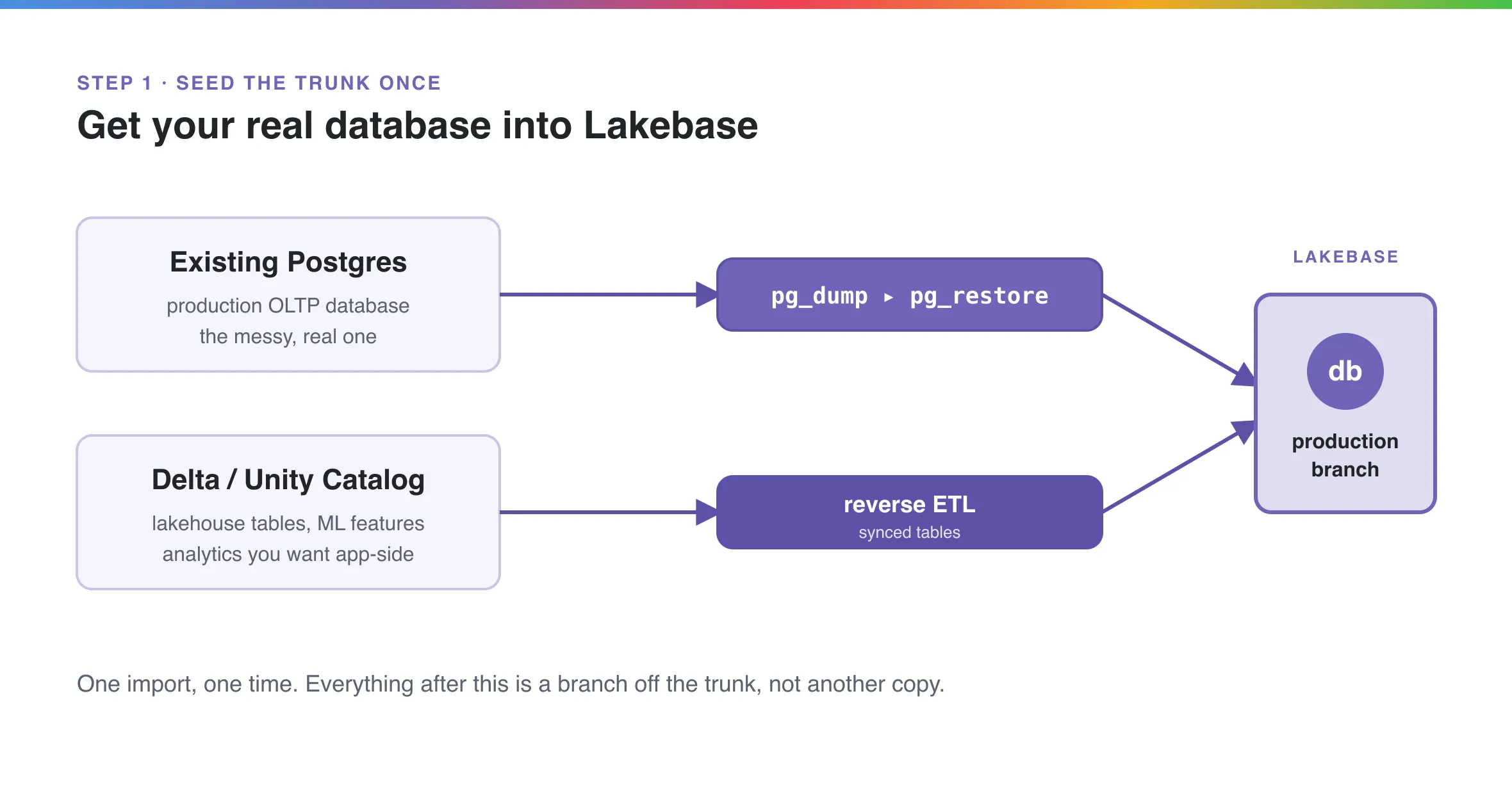
If you already run Postgres, it is pg_dump and pg_restore, unchanged. Lakebase is regular Postgres, so your existing tooling works. Grab a native-password connection string from the Lakebase console (native passwords do not expire hourly the way OAuth tokens do, which matters for a long dump), then:
# Back up your current production database
pg_dump -Fc -v -d "postgresql://role:pw@your-source-host/appdb?sslmode=require" -f prod.bak

# Restore it into the Lakebase project's production branch
pg_restore -v -d "postgresql://role:pw@ep-prod-xyz.databricks.com/databricks_postgres?sslmode=require" prod.bak
-Fc writes a custom-format archive, which is what pg_restore wants and what lets you parallelize a restore later if the database is large.
If the data you care about lives in the lakehouse, the enrichment, the ML features, the aggregates your app reads but your analysts own, you do not build a pipeline. Lakebase syncs Unity Catalog and Delta tables into Postgres natively through reverse ETL synced tables. Pick the cadence: snapshot for a one-shot load, triggered for scheduled refreshes, or continuous for near-real-time (down to a 15-second floor). No custom job, no retries to babysit.
Either way, you do this once. Everything after it is a branch off the trunk, not another full copy. That distinction is the entire economic argument, and it is worth internalizing before the next step.
Step 2: branch per pull request
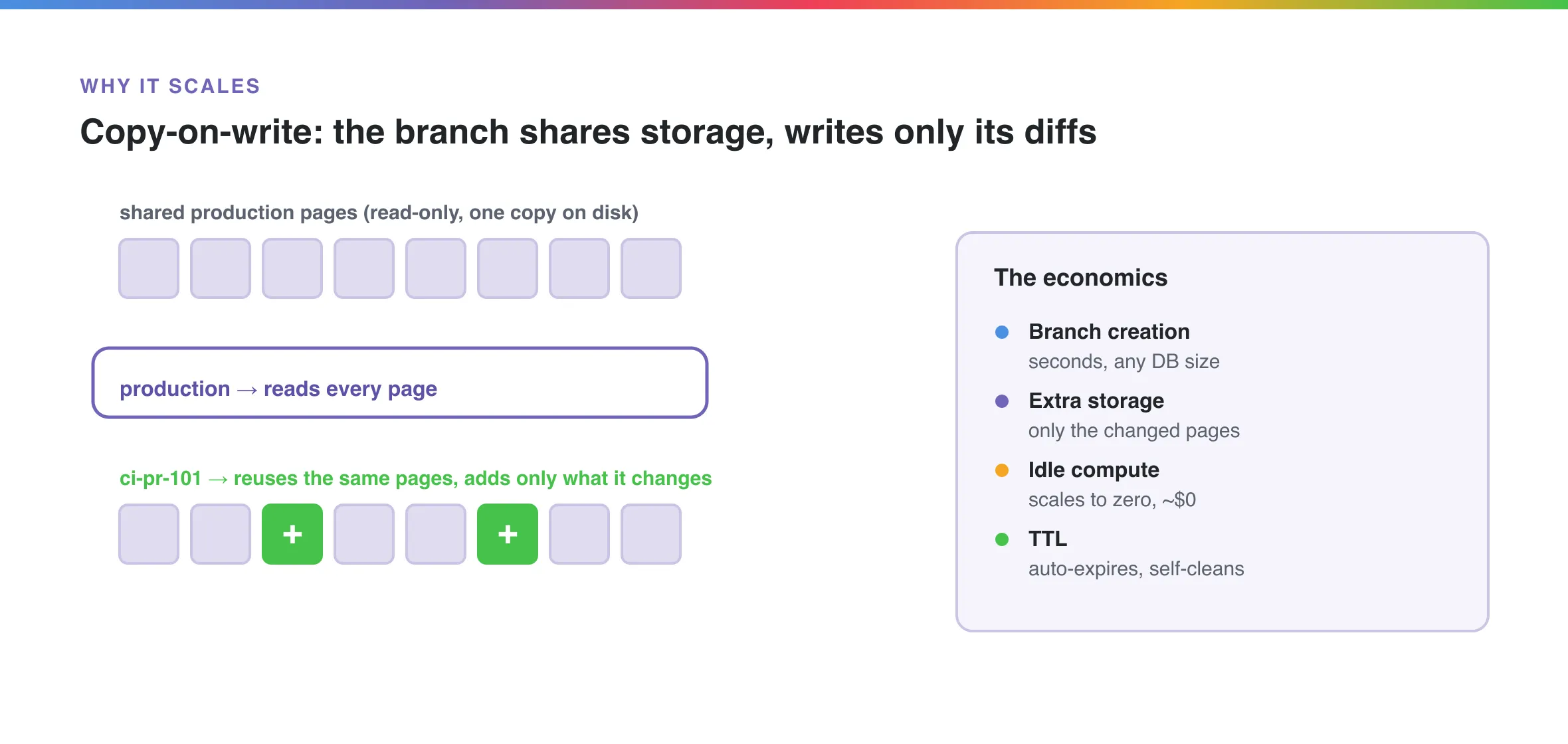
A Lakebase branch is a copy-on-write clone. It starts from the exact schema and data of its parent at a point in time, shares the parent’s underlying storage instead of duplicating it, and only writes new pages when your branch actually changes something. Creation takes seconds regardless of database size, because nothing is being copied.
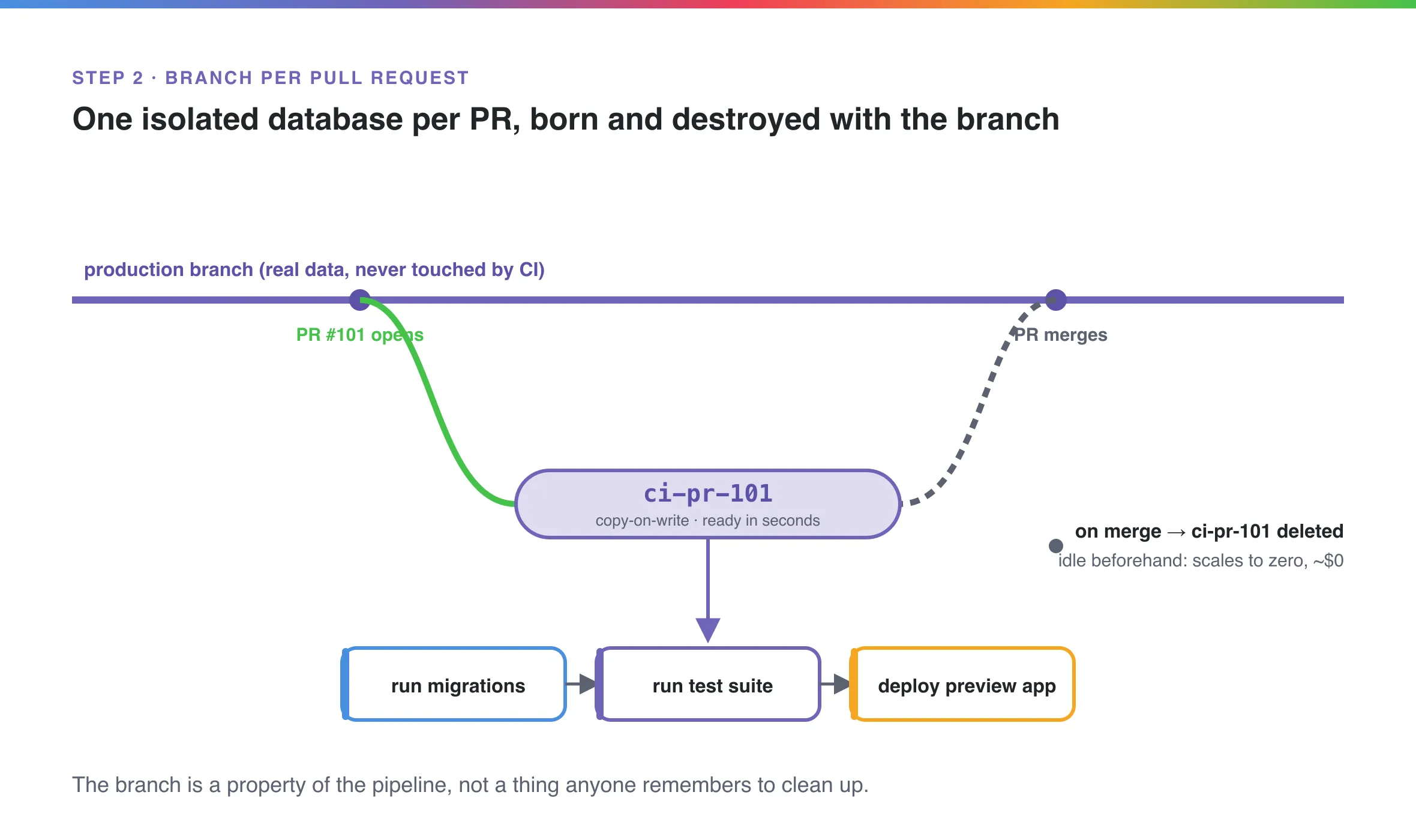
Do it by hand first, so you can see it work. Fork a branch off production with a time-to-live so it cleans itself up:
databricks postgres create-branch projects/app ci-pr-101 \
  --json '{"spec": {"source_branch": "projects/app/branches/production", "ttl": "86400s"}}'
That gives you ci-pr-101: a fully isolated Postgres database with a real copy of production behind it, its own connection string, and a 24-hour self-destruct. Point your migration runner at it, apply the branch’s schema changes, and aim the PR’s preview app at the same connection string. The reviewer now sees the feature running on data that behaves like production, because it is production, forked.
Break something? Drop the branch and fork a fresh one. The reset is instant and it costs nothing, because you never copied the data in the first place.
Step 3: make it a property of the pipeline
Manual branching proves the idea. CI is what makes it a habit nobody has to remember. The pattern, which Databricks ships as templates in its open-source Lakebase app dev kit, is two workflows:
pr.ymltriggers onpull_request: [opened, synchronize]. It createsci-pr-<N>forked from the PR’s base branch, applies your migrations against that branch, runs the test suite against real Postgres, and posts the schema diff back as a PR comment so a human reviews the database change alongside the code change.merge.ymltriggers on merge and deletes the branch. Acleanup-orphansjob and the branch TTL are the backstop, so a crashed run never leaves an environment (or a bill) lying around.
The important word is property. Once this is wired, every PR gets an isolated, production-grade database because the pipeline guarantees it, not because a developer followed a runbook. Ephemerality stops being a discipline and becomes a fact of the system. If you have read the Tarmac 10, this is what “environments are automated and disposable” looks like when the database finally joins the party.
The economics, and the part you still own
The reason this is affordable is three properties stacking: copy-on-write means a branch costs only its own changed pages, idle branches scale to zero, and TTLs delete them before anyone forgets. Fifty open PRs is fifty databases and roughly the storage of fifty small diffs, not fifty full copies.
Here is the honest counter-argument, the one a good security lead raises immediately: a branch of production is production data, and spraying it across preview environments is a compliance problem. Correct. Branching does not launder PII. What it does is move the problem to one place you can actually control. You mask, tokenize, or drop sensitive columns once, at the trunk, when you seed it in Step 1. Every branch inherits the masked data for free, and Unity Catalog governs who can reach any of it. For regulated data that is a real task, not a checkbox, and it is yours to do. What you get in return is that you do it once instead of re-solving it per environment.
Synthetic data tells you the code runs. A branch of the real database tells you the product works, against the messy, skewed, edge-case-riddled data your customers actually have. For most CRUD apps the difference is academic. For complex data products it is the difference between catching the bug in review and catching it in an incident.
That is worth building for. If you are standing up Lakebase and want the branch-per-PR workflow wired into your pipeline properly, that is the kind of thing we do.