Feeling uninspired? Let the AI assist you with your end-of-day status emails!
Being a developer is not just about coding. We need to keep good communication with the people involved on our projects.
Being a developer is not just about coding. We need to keep good communication with the people involved on our projects. That’s why a good end of day email is a must in almost every project.
Some people are not very expressive in their writing or are feeling uninspired. They struggle a bit going back into the tickets again and writing something that gives visibility about their tasks.
I’m doing some research of the possible uses of OpenAI LLM because, as we all know, AI writes better than most of us. So I’ve written a small Python script that serves as a sort of “assistant” who helps you write these emails.

Since I use Jira and Slack at work, and they are the most widely-used at the moment, I’ll use them for my example below.
Before starting, we need:
-
Jira API token: here
-
Slack API token from a installed Slack app on your workspace: here
-
OpenAI API key: here
Let’s define some basic methods to send Slack messages, then use OpenAI chat completion service and get your Jira tickets:
from decouple import config
from jira import JIRA
import openai
import slack

def slack_send_message(message, channel="#general"):
    slack_token = config('SLACK_API_TOKEN')
    client = slack.WebClient(token=slack_token)
    client.chat_postMessage(
        channel=channel, text=message)

def generate_status(prompt, model="gpt-3.5-turbo"):
    openai.api_key = config('OPENAI_API_KEY')
    messages = [{"role": "user", "content": prompt}]
    response = openai.ChatCompletion.create(
        model=model,
        messages=messages,
        temperature=0,
    )
    return response.choices[0].message["content"]

def get_jira_tickets(query, fields):
    email = config('EMAIL')
    jira_api_key = config('JIRA_API_TOKEN')
    jira__server = config('JIRA_SERVER')
    jira = JIRA(
        server=jira__server,
        basic_auth=(email, jira_api_key)
    )

    return jira.search_issues(query, json_result=True, fields=fields)
Now, we can start generating our status text:
# First we need to get our current tickets
tickets_data = get_jira_tickets(
    "(status='In Progress') AND assignee='Gaston Cerrillo'",
    ['summary', 'description']
)

# After that we connect and create the prompt for the IA with our data

prompt = f"""
Your task is to write a status update paragraph explaining what work I am doing today, \
    it needs to be short but give visiblity and not just repeating the ticket content
you will be provided with a JSON object delimited by triple backticks with information about \
the tickets that are in progress. Do this in bullet points
Tickets data: ```{tickets_data}```
"""

status_text = generate_status(prompt)

# Finally we send the status through the slack bot

slack_send_message(status_text)
Pay special attention to the prompt because it is the most important part of the script. The output is going to be as good as the prompt defines it to be.
Here’s an example:
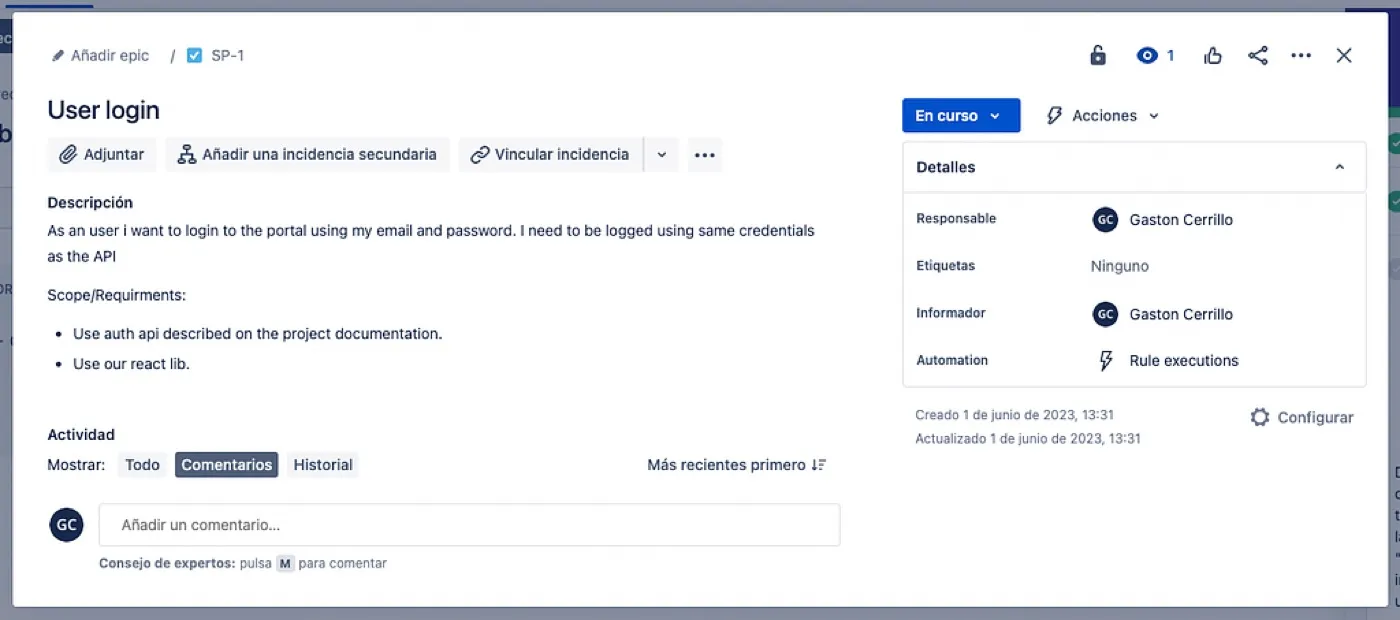
This is an example story, which shows a task with a description related to the issue.
Check the code below:
tickets_data = get_jira_tickets(
    "(status='In Progress') AND assignee='Gaston Cerrillo'",
    ['summary', 'description']
)
I prepared that example query to select all of my assigned tasks in progress and this provides a JSON object with the requested data of the tickets (in this case, summary and description).
{
'expand': 'names,schema',
'startAt': 0,
'maxResults': 50,
'total': 1,
'issues': [
  {
    'expand': 'operations,versionedRepresentations,editmeta,changelog,renderedFields',
    'id': '10000',
    'self': 'https://atlassian.net/rest/api/2/issue/10000',
    'key': 'SP-1',
    'fields': {
      'summary': 'User login',
      'description': 'As an user i want to login to the portal using my email and password. I need to be logged using same credentials as the API\n\nScope/Requirments:\n\n* Use auth api described on the project documentation.\n* Use our react lib.'
    }
   }
  ]
}
This is the data we’re putting in the prompt to give current context of our status, that input is being sent to OpenAI API to generate a text following the prompt instructions.
After generating the text, you call slack_send_message method that we have already defined before with that text as input. It will sent the text through our previously configured slack bot:
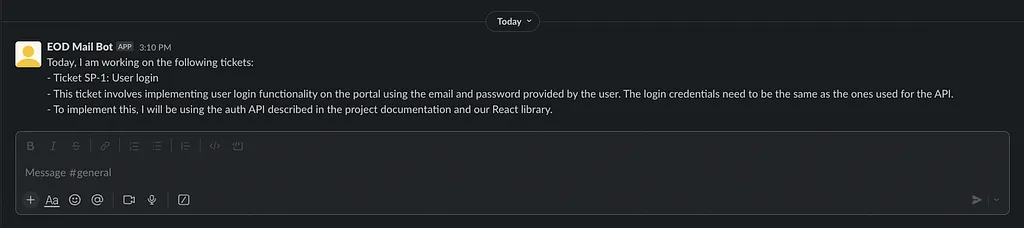
So, that’s it. You now have a script that writes a status text draft for you. It’s a good idea to schedule a local script and run it everyday at the end of the day.
LINKS: